
A WYSIWYG editor to edit Markdown files?
Interrested ? Follow the guide!
[Update] Typora is not an open-source software, and only the beta version seems to be free. If taking habits on a free soft to later paid software bores you, we suggest using a open-source typora clone: MarkText.
Typora MarkText, From Markdown, with Love
This tool is called typora, and the official site is there: typora MarkText
I present to you this tool that I will test for the series of articles around gitlab CI / CD.
It is available for Windows, Linux, and Mac OS.
Get the power of Markdown, without using Markdown
The editor features provide you the power of the markdown format, because it is possible to save files directly in markdown, but also to copy the text in markdown format.
What You See Is What You Get
Here is the article, in its french version, opened with typora. (MarkText would have the exact same result)

You can apply the style you want (Header 1-2-3, bold, etc. ) by selecting it in the menu, or using the standard shortcuts (CTRL+B, CTRL+I)
Save in Markdown
You just have to save the file with marktext (only .md is authorized) or choose markdown with typora (which propose .txt too)
Export markdown content
Typora MarkText let you export (or copy) a part of the document, directly with the markdown syntax.
Here is the result of the export with the french version of the article:
Un éditeur WYSIWYG pour éditSauvegarder au format MDer des fichiers Markdown ?

Si ça vous intrigue, suivez le guide !

# Typora, par amour du markdown

C'est outil s'appelle typora, et le site officiel est là: [typora](https://typora.io/)

Je vous présente cet outil que je vais tester pour la série d'article autour de gitlab CI/CD.

Il est disponible pour Windows, Linux, et en version beta (à l'heure d'acriture de ces lignes) pour Mac OS.

## Des fonctionnalités pour profiter de la puissance du markdown

Les fonctionnalités de l'éditeur permettent de profiter de la puissance du format markdown, car il est à la fois possible de sauvegarder des fichiers directement en markdown, mais également de copier le texte au format markdown.

### Un éditeur wysiwyg

Voici, par exemple, le rendu de cet article (dans sa version française)
You only have to select the part you want to export, and use the menu entry, or use the shortcut: CTRL + MAJ + C (the shortcut works on both typora and marktext)
Spell checker
I assume that you know what I am talking about.
Markdown quality
We use, to ensure quality of our markdown files syntax, a tool called markdownlint. The french version of the post got that result:
$ mdl content/posts/*.md --ignore-front-matter --rules ~MD013,~MD026,~MD033
content/posts/typora_fr.fr.md:13: MD009 Trailing spaces
content/posts/typora_fr.fr.md:15: MD009 Trailing spaces
content/posts/typora_fr.fr.md:21: MD009 Trailing spaces
content/posts/typora_fr.fr.md:23: MD009 Trailing spaces
content/posts/typora_fr.fr.md:27: MD009 Trailing spaces
content/posts/typora_fr.fr.md:39: MD009 Trailing spaces
content/posts/typora_fr.fr.md:45: MD009 Trailing spaces
content/posts/typora_fr.fr.md:47: MD009 Trailing spaces
content/posts/typora_fr.fr.md:50: MD009 Trailing spaces
content/posts/typora_fr.fr.md:52: MD009 Trailing spaces
content/posts/typora_fr.fr.md:58: MD009 Trailing spaces
content/posts/typora_fr.fr.md:60: MD009 Trailing spaces
content/posts/typora_fr.fr.md:64: MD009 Trailing spaces
content/posts/typora_fr.fr.md:75: MD009 Trailing spaces
content/posts/typora_fr.fr.md:81: MD009 Trailing spaces
content/posts/typora_fr.fr.md:82: MD009 Trailing spaces
content/posts/typora_fr.fr.md:84: MD009 Trailing spaces
content/posts/typora_fr.fr.md:96: MD009 Trailing spaces
content/posts/typora_fr.fr.md:100: MD009 Trailing spaces
content/posts/typora_fr.fr.md:109: MD009 Trailing spaces
content/posts/typora_fr.fr.md:35: MD012 Multiple consecutive blank lines
content/posts/typora_fr.fr.md:36: MD012 Multiple consecutive blank lines
content/posts/typora_fr.fr.md:90: MD012 Multiple consecutive blank lines
content/posts/typora_fr.fr.md:91: MD012 Multiple consecutive blank lines
content/posts/typora_fr.fr.md:105: MD012 Multiple consecutive blank lines
content/posts/typora_fr.fr.md:106: MD012 Multiple consecutive blank lines
The markdown syntax seems to be good. The only thing that isn't fixed by the tool is the rules that concern double spaces, spaces in the end of lines, double blank lines, etc.
In a word: everything that you can SEE on the wySiwyg.
The purpose of using Marktext/Typora
Hugo websites posts
typora MarkText is very usefull to write Hugo website text content, likes posts or authors descriptions.
For example, you can just copy the MD content in the gitlab/github web editor, paste it on Marktext, modify it, and copy as MD to re paste it on the gitlab/github editor.
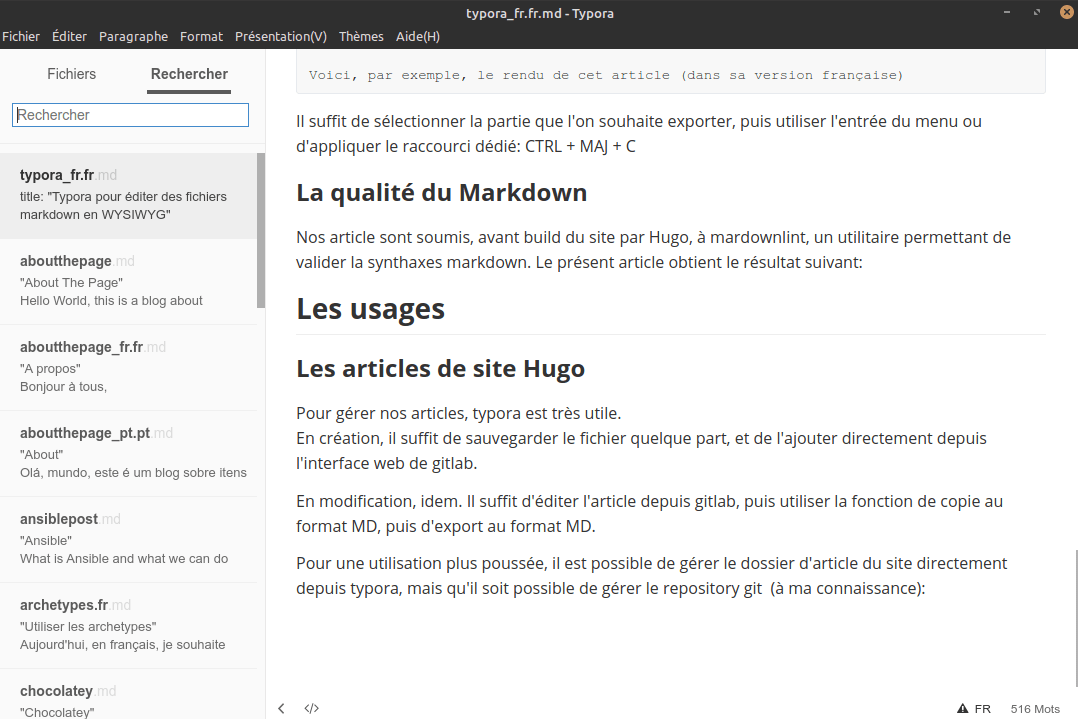
You can also manage the content foder directly on the tool, but you'll have to use git in bash to push your modification on the gitlab/github repository:
Our tools
We're using a set of tool based on (or compliant with) markdown:
- Wikis;
- Basecode READMEs;
- KB;
- ADR
The export tool (aka copy as markdown) is very useful to be able to edit text as in a standard texte editor, but being able to use the power of markdown when you want to change the structure of a text. This case commonly appears when editing a wiki or a kb pages. The more we add, the more we need to review the structure.
Conclusion
I will start the articles about gitlab CI/CD with Marktext, and, to be honest, I truly think that I will get back to a MD editor.
But I have to confess that it is a great tool for those who want to get the power of markdown without learning/practicing the syntax. And I'm not totally sure that I will get back to a standard editor after I get habits on Marktext...